
In the previous sections, we learned the fundamentals for starting with Usenet: finding a reliable Usenet server provider, getting a Usenet client, finding Usenet indexers, and finally, downloading content.
In this section, we will go through a few more advanced tips and tricks you should practice when using Usenet.
As with any online activity, staying safe while using Usenet is essential. Although we encourage VPN use, (especially when connecting to public networks) for staying safe in Usenet, it is not needed.
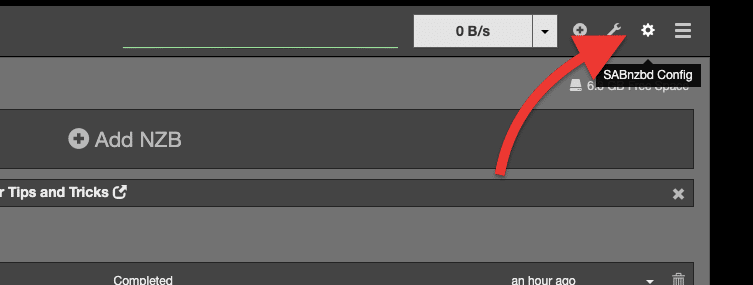 Image by SABnzbd
 Photo by SABnzbd
Bonus tip: Using a Seedbox that runs Usenet clients such as NZBGet and SABnzbd will not only help you streamline your entire download process, but it will also protect your privacy and security. But that is not all; a seedbox also provides fast speeds and ample storage on the cloud, so you can download NZB files without using your bandwidth.
The Usenet system is organized into hierarchical categories or repositories called “newsgroups.” To manage the vast amount of content on Usenet into a manageable, navigable form, Usenet uses a tree — a hierarchical structure of Usenet newsgroups. This tree is structured into branches and sub-branches, each corresponding to a particular category of content or discussion topic.
On Usenet, you can find these newsgroups where millions of users access and read articles through the newsreader (or Usenet Client). These users can also leave comments and ask questions regarding the posted articles. There are thousands of newsgroups covering a diverse range of subjects.
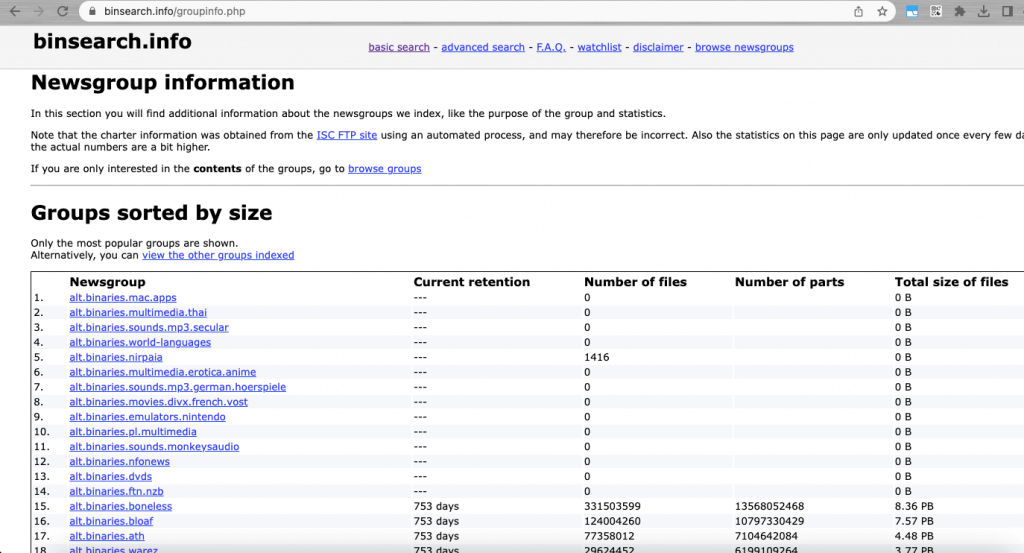 Photo by binsearch.info
From the example above, you’ll notice a few values, such as Newsgroup, Current retention, number of files, number of parts, and total size of files. But what does it all mean?
As an example, we will be looking into a specific newsgroup. The newsgroup items on the list will take you to a new window that shows relevant and detailed newsgroup information. You’ll also have access to browse all the content that the specific newsgroup provides. To see what’s available for the newsgroup, click “Browse …” below Options.
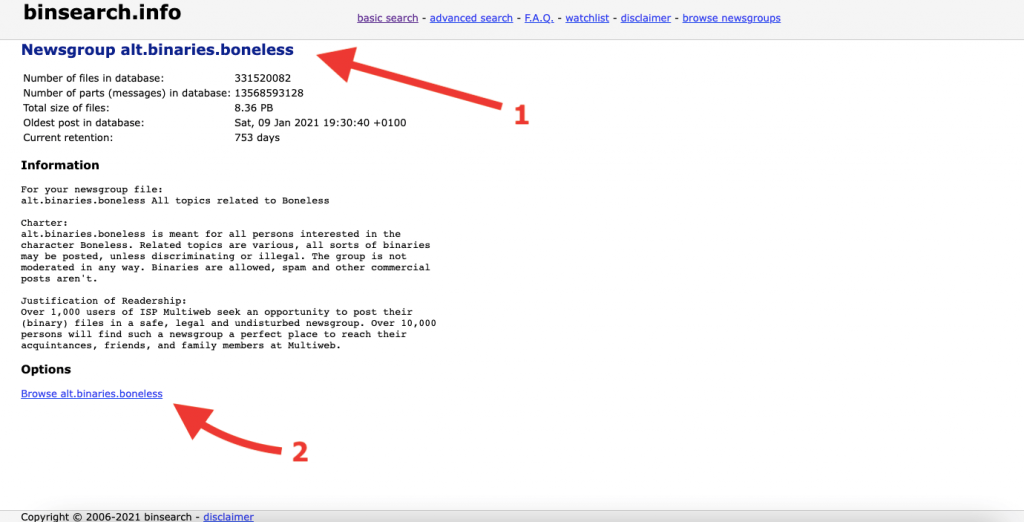 Photo by binsearch.info
Like any online community, Usenet has its own set of unwritten rules and net etiquette (netiquette). These are usually unofficial rules for good behavior and politeness to fellow Usenet users. Usenet is, after all, a community built and maintained by everybody (including you!).
So let’s go through the following guidelines to make the most of your experience when downloading content from a Usenet community:
Download automation software helps you automate the process of downloading content, such as TV shows, movies, and music, from the internet—most of these kinds of software work for both Usenet and BitTorrent.
The download automation software (Sonarr, Radarr, Readarr, etc.) monitors your favorite content on Usenet or torrent indexers and automatically downloads as it becomes available. Automation software like Sonarr and Radarr uses RSS feeds to monitor new content. The software will periodically check the RSS feeds (which you configure) for new content, and when it finds one, it will download using your preferred download client (e.g., BitTorrent, NZBGet).
Below is an example of configuring Usenet with a download client on Sonarr. You’ll notice that Sonarr comes with a predefined configuration for popular Usenet and Torrent clients. You only need to configure network parameters like the host (or IP address), credentials, and ports.
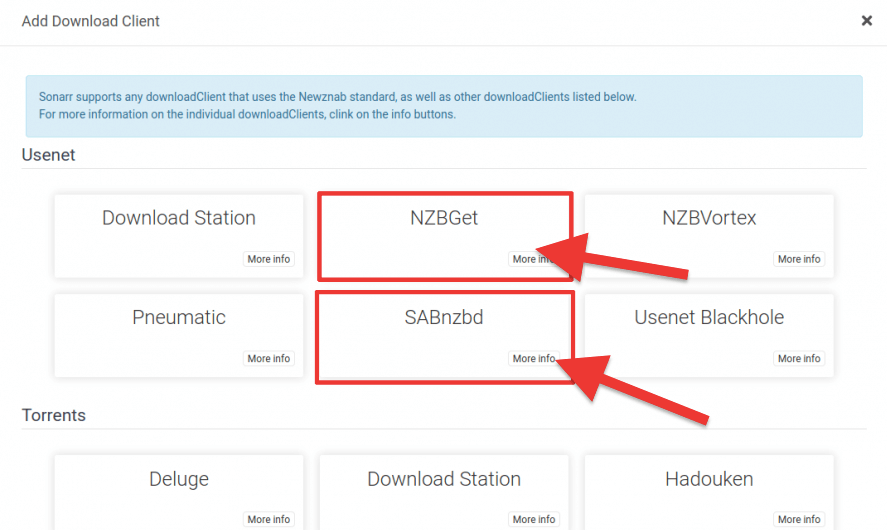 Photo by Sonarr
In this section, we will go through a few more advanced tips and tricks you should practice when using Usenet.
a. How to stay safe on Usenet.
As with any online activity, staying safe while using Usenet is essential. Although we encourage VPN use, (especially when connecting to public networks) for staying safe in Usenet, it is not needed.
- Usenet download programs (Clients) utilize a secure TLS “encrypted” connection to the Usenet servers (port 443 or 563 generally). Always enable SSL connection when you configure the Usenet server provider on your client. An SSL encryption helps protect your privacy and secure your connections to Usenet servers.
- To enable SSL encryption in SABnzbd, go to the config.
- Go to Servers (1) > Show details (2) > Enable SSL (3).
Bonus tip: Using a Seedbox that runs Usenet clients such as NZBGet and SABnzbd will not only help you streamline your entire download process, but it will also protect your privacy and security. But that is not all; a seedbox also provides fast speeds and ample storage on the cloud, so you can download NZB files without using your bandwidth.
b. Familiarize yourself with newsgroups
The Usenet system is organized into hierarchical categories or repositories called “newsgroups.” To manage the vast amount of content on Usenet into a manageable, navigable form, Usenet uses a tree — a hierarchical structure of Usenet newsgroups. This tree is structured into branches and sub-branches, each corresponding to a particular category of content or discussion topic.
On Usenet, you can find these newsgroups where millions of users access and read articles through the newsreader (or Usenet Client). These users can also leave comments and ask questions regarding the posted articles. There are thousands of newsgroups covering a diverse range of subjects.
- Familiarize yourself with the structure and purpose of each newsgroup to make it easier to find the content you’re looking for.
- Note that each group within this newsgroup’s hierarchical structure contains different types of content. Each Usenet indexer works using newsgroups.
- An example of a newsgroup indexed by binsearch is > https://binsearch.info/groupinfo.php. This page shows the group list of the newsgroup. It also shows the goal of this group and overall statistics.
i. What to notice in newsgroups?
From the example above, you’ll notice a few values, such as Newsgroup, Current retention, number of files, number of parts, and total size of files. But what does it all mean?
- Newsgroup: A newsgroup is a discussion group within Usenet that is focused on a specific topic.
- Current retention: Current retention refers to the time that articles and posts within a newsgroup are stored on a Usenet server. A higher retention rate means more content is available for users.
- The number of files: This refers to the total number of individual files available within a specific newsgroup.
- The number of parts: This refers to the number of parts a file within a newsgroup is divided into. The number of parts is important because it affects the speed and efficiency of downloads.
- The total size of files: This refers to the total size of all the files available within a specific newsgroup. This information helps assess the amount of storage space you will need to download the content within the newsgroup.
ii. What’s inside a newsgroup?
As an example, we will be looking into a specific newsgroup. The newsgroup items on the list will take you to a new window that shows relevant and detailed newsgroup information. You’ll also have access to browse all the content that the specific newsgroup provides. To see what’s available for the newsgroup, click “Browse …” below Options.
c. Stick to the established netiquette rules.
Like any online community, Usenet has its own set of unwritten rules and net etiquette (netiquette). These are usually unofficial rules for good behavior and politeness to fellow Usenet users. Usenet is, after all, a community built and maintained by everybody (including you!).
So let’s go through the following guidelines to make the most of your experience when downloading content from a Usenet community:
- Avoid spamming: Spamming refers to posting irrelevant or excessive messages within a newsgroup. This is considered poor etiquette and can lead to your account being banned.
- Respect copyrights: Only download content you have the legal right to access. Pirated content is against the law and can result in legal consequences. Torrent gets a similar problem. Learn more about the risks of torrenting and its legal/illegal aspects.
- Don’t cross-post: Cross-posting refers to posting the same message in multiple newsgroups. This is considered poor etiquette and can lead to your account being banned.
- Don’t hijack threads: Hijacking a thread refers to changing a discussion topic without the original poster’s consent. This is considered poor etiquette and can lead to your account being banned.
- Be polite: Be respectful and courteous when communicating with other users in the Usenet community. Avoid using offensive language or making personal attacks.
- Follow the guidelines of each newsgroup: Each newsgroup has its own guidelines and etiquette rules. Be sure to familiarize yourself with these before posting in a newsgroup.
- Don’t post illegal or inappropriate content: Usenet has strict rules against posting illegal or inappropriate content. Doing so can result in legal consequences.
- Use a descriptive subject line: When posting a message, use a descriptive subject line that accurately reflects the content of your post. This makes it easier for others to find and follow your discussion.
d. Use download automation software.
Download automation software helps you automate the process of downloading content, such as TV shows, movies, and music, from the internet—most of these kinds of software work for both Usenet and BitTorrent.
The download automation software (Sonarr, Radarr, Readarr, etc.) monitors your favorite content on Usenet or torrent indexers and automatically downloads as it becomes available. Automation software like Sonarr and Radarr uses RSS feeds to monitor new content. The software will periodically check the RSS feeds (which you configure) for new content, and when it finds one, it will download using your preferred download client (e.g., BitTorrent, NZBGet).
i. A few examples of this download automation software are as follows:
- Sonarr and Radarr: Sonarr and Radarr are both open-source programs that automate the downloading of TV shows and movies, respectively. Learn more about this in our ultimate guide to Sonarr.
- Readarr: Also from the same arr family, Readarr is the ebook/audiobook download automation software.
- Sick Beard: Sick Beard is a personal video recorder (PVR) for newsgroup users with limited torrent support. It automates the process of downloading new episodes of your favorite TV shows. When new episodes are posted on the Usenet or torrents, Sick Beard detects them and automatically downloads, sorts, and renames them.
Below is an example of configuring Usenet with a download client on Sonarr. You’ll notice that Sonarr comes with a predefined configuration for popular Usenet and Torrent clients. You only need to configure network parameters like the host (or IP address), credentials, and ports.